Spring
Spring framework features
Spring is a container of frameworks and features organized into modules. These modules are grouped into:
- Core
- Data access/integration
- Web
- AOP (Aspect Oriented Programming)
- Instrumentation
- Messaging
- Test
Core
- spring-core contains IoC (inversion of control) and DI (dependency injection) features. The BeanFactory is a factory pattern, avoiding the need for programmatic singletons and allowing for configuration of dependencies
- spring-context is useful to access objects in a framework-style manner similar to a JNDI registry (????)
- spring-context-support provides support for integrating third-party libraries into a Spring application context
- spring-expression provides object graph manipulation
Data access
- spring-jdbc: SQL driver layer
- spring-tx: transaction management for POJOs
- spring-orm: JPA, Hibernate
- spring-jms: (Java Messaging Service) features for producing and consuming messages
Web
- spring-web: HTTP, multipart file upload, IoC container using servlet listeners, web application context. HTTP client, remoting support
- spring-webmvc: MVC, REST web services implementation for web apps
- spring-websocket
Spring app
@SpringBootApplication
A single @SpringBootApplication can be used to enable three features (is equivalent to using):
@EnableAutoConfigurationenables Spring Boot's auto-configuration mechanism@ComponentScanenables@Componentscan on the package where the app is located@Configurationallows to register extra beans in the context or import additional configuration classes
General information
Inversion of Control (IoC)
The control of objects or portions of the program is transferred to the framework. IoC is used in OOP, it enables the framework to take control of the flow of the program and make calls
IoC pros:
- Decoupling execution of a task from its implementation
- Making it easier to switch between different implementations --> interfaces
- Greater modularity of a program
- Ability to mock dependencies and allowing components to communicate through contracts (interfaces, traits)
Types of IoC:
- Dependency lookup: traditional approach
- Dependency pull: fetched from a registry as required
- Contextualized dependency lookup: performed against the container managing the resource, not some central registry
- Dependency injection (DI): more flexible
- Constructor DI: one or more constructors declaring dependencies
- Setter DI (recommended for optional dependencies)
- Field-based DI:
@Autowiredon fields using reflection
The core of DI is based on the Spring BeanFactory Container:
POJOs + Configuration metadata (XML, annotations) => configured system
Types of IoC containers
BeanFactory
Resource resource = new ClassPathResource("applicationContext.xml");
BeanFactory factory = new XmlBeanFactory(resource);
This is the simplest container providing basic support for DI. BeanFactory and related interfaces (BeanFactoryAware, InitializingBean, DisposableBean) are in Spring for backward compatibility for third-party frameworks
ApplicationContext
ApplicationContext context = new ClassPathXmlApplicationContext("applicationContext.xml");
This container adds more enterprise-specific functionality, such as the ability to resolve messages from a properties file, and to publish application events to event listeners
Bean
A bean is an object instatiated and managed by the Spring IoC container. Every BeanDefinition object has:
- A package-qualified class name
- Bean behavioral configuration elements (scope, lifecycle callbacks)
- References to other beans (collaborators or dependencies)
- Other configuration settings (i. e. number of connections in a connection pool bean, size limit of the pool)
The IoC container is responsible for instantiating, wiring, and managing the lifecycle of Beans.
Bean creation process
Instantiate --> Populate properties --> Call setBeanName of BeanNameAware --> Call setBeanFactory of BeanFactoryAware --> Call setApplicationContext of ApplicationContextAware --> Preinitialization (BeanPostProcessors) --> afterPropertiesSet of initializing Beans --> Custom Init method --> Post initialization (BeanPostProcessors) --> Bean ready to use
High level steps:
- Bean defined using XML or annotations
- Created bean is loaded into
ApplicationContextand JVM memory - Spring container will create a bean id, scope, default values
- Post initialization: metadata details, callback methods, lifecycle
- Ready to use: the bean is injected
Bean destruction process
Container shutdown --> Disposable Bean's destroy() --> Call custom destroy method
High level steps:
- Pre-destroy callback methods for custom app logic and cleanups before destroying from
ApplicationContext - Bean removed and destroyed in JVM memory
Ways to control Bean lifecycle
- Aware interfaces: used within the framework, not very used by programmers
- Bean post processor
InitializingBeanandDisposableBeancallback interfaces (afterPropertiesSetand ??? methods)- Custom
initanddestroymethods
Bean lifecycle use cases
- Default values for bean properties (i.e.
FILE_PATH,MIN_VALUE,MAX_VALUE) - Acquiring resources (opening and closing files, db connections)
- App metadata
- Start or terminate process or thread
- Make sure external services and db are up and running
Bean scopes
- Singleton (default): single bean instance per IoC container
- Prototype: opposite to singleton, new instance every time a bean is requested
- Request: one instance per HTTP request (complete lifecycle uses single bean)
- Session: one instance per HTTP session (complete lifecycle uses single bean)
- Application: single instance created and used during the lifecycle of
ServletContext - WebSocket: one instance per WebSocket
@Component
@Scope("singleton") // redundant, singleton is default scope
public class BeanClass { ... }
Singleton bean: creates and caches the created bean. All references to that bean return the cached instance, the same object
@Component
@Scope("prototype")
public class BeanClass { ... }
Prototype scope: new bean instance every time the bean is called. Does not use destruction lifecycle methods
@Component
@RequestScope // or @Scope("request")
public class BeanClass { ... }
Request scope: a bean instance for every HTTP request, each one with its own state
@Component
@SessionScope // or @Scope("session")
public class BeanClass { ... }
Session scope: a bean instance for every HTTP session. All HTTP requests within a session have access to the same bean
@Component
@ApplicationScope // or @Scope("application")
public class BeanClass { ... }
Application scope: a bean instance per web application runtime. Similar to singleton scope, except:
- Application scope is singleton per
ServletContext, singleton scope is singleton perApplicationContext - Application scope is visible as a
ServletContextattribute
@Component
@Scope("websocket")
public class BeanClass { ... }
WebSocket scope: a bean instance per TCP socket. Mostly singletons, as they tipically live longer than any WebSocket session
Bean dependencies
Objects define their dependencies through their constructors, setters, or fields. Let's see how this is handled with Spring beans
// without using beans
public class Company {
  private Address address;

  public Company(Address address) {
    this.address = address;
  }
  // getter, setter...
}

public class Address {
  private String street;
  private int number;
  // constructor, getters, setters...
}

Address address = new Address("High Street", 1000);
Company company = new Company(address);
Now with beans:
@Component
public class Company {
  private Address address;

  public Company(Address address) {
    this.address = address;
  }
}

@Configuration
@ComponentScan(basePackageClasses = Company.class)
public class Config {
  @Bean
  public Address getAddress() {
    return new Address("High Street", 1000);
  }
}

ApplicationContext context = new AnnotationConfigApplicationContext(Config.class);

Company company = context.getBean("company", Company.class);
Here the Company bean is using constructor DI (the preferred way for mandatory dependencies) to inject the Address bean
Configuration metadata
XML-based config
<?xml version="1.0" encoding="UTF-8"?>
<beans xmlns="url..."
xmlns:xsi="url..."
xsi:schemaLocation="url...">
  <bean id="..." class="...">
    <!-- collaborators and configuration for this bean go here -->
  </bean>
  <bean id="..." class="...">
    <!-- collaborators and configuration for this bean go here -->
  </bean>
  <!-- more bean definitions go here -->
</beans>
Here, the id attribute is a string that identifies the bean definition. The class attribute defines the type of the bean: it must use the fully qualified classname
XML imports
<beans>
  <import resource="services.xml"/>
  <import resource="resources/messageSource.xml"/>
  <import resource="/resources/themeSource.xml"/>

  <bean id="bean1" class="..."/>
  <bean id="bean2" class="..."/>
</beans>
Annotation-based config
Uses bytecode metadata. It is performed before XML injection, so XML configuration overrides annotations if both approaches are used. Use <context:annotation-config/> in the XML config to allow annotations such as @Required, @Autowired, @Qualifier
Java-based config
This is equivalent to defining a bean in XML style above:
@Configuration // use class as a source of bean definitions
public class AppConfig {

  @Bean
  public MyService myService() {
    return new MyServiceImpl();
  }
}
DI-related annotations
@Bean
Marks a factory method which instantiates the bean. Analogous to the <bean/> element. By default, the bean name will be the method name. You may define custom bean names:
@Bean({"b1", "b2"}) // bean available as 'b1' and 'b2', but not 'myBean'
public MyBean myBean() {
  // instantiate and configure MyBean obj
  return obj;
}
@Autowired
Mark a dependency, either as constructor, setter or field. From v4.3 we don't need to annotate constructors with @Autowired unless we declare at least two constructors
class Car {
  Engine engine;

  @Autowired // constructor DI using Autowired. Not necessary if 1 constructor
  Car(Engine engine) {
    this.engine = engine;
  }
}
@Qualifier
Used with @Autowired when there are more than one interface implementations (beans). @Qualifier("someImplementation") specifies which implementation to wire
@Primary
Used to point to the default implementation to wire when using multiple implementations and @Qualifier is not present
// Car and Bike both implement the same interface
@Component
@Primary
class Car implements Vehicle {}

@Component
class Bike implements Vehicle {}

@Component
class Driver {
  @Autowired // what impl to inject? Car will be injected thanks to Primary
  Vehicle vehicle;
}
@Component
class Biker {
  @Autowired
  @Qualifier("bike") // using Qualifier removes ambiguity: Bike will be used
  Vehicle vehicle;
}
@Required
Used in bean setters, indicates that the property must be populated in XML configuration, or else a BeanInitializationException will be thrown
@Value
Used to assign default values to variables and method arguments
@Value("8") // field DI example
int cylinderCount;
@DependsOn
Make Spring initialize other beans before the annotated one. Used for static variable initialization, JDBC driver loading
@Lazy
By default, Spring is eager and initializes beans at startup of the application context. @Lazy behaves differently on its location:
- Lazy
BeanorComponentwill delay the method call (bean creation) - Lazy
Configurationwill affect all its beans. Using@Lazy(false)in some inner bean will mark that bean as eager - Lazy
Autowiredto load the dependency lazily
@Configuration
@Lazy // all beans inside VehicleFactoryConfig are lazy unless specified
class VehicleFactoryConfig {

  @Bean
  @Lazy(false) // this bean is eager
    Engine engine() {
    return new Engine();
  }
}
@Scope
Defines the scope of a @Component or @Bean (singleton, prototype, request, session, globalSession)
@Lookup
Injects a dependency using its method return type and parameters as arguments. Allows to inject dependencies procedurally. Useful to inject prototypes (one instance per init) into singletons
@Component
public class StudentServices {
    @Lookup
    protected abstract SchoolNotification getNotification(String name); // will get a SchoolNotification object

  public String someMethod {
    String name = getAStringFromSomewhere();
    SchoolNotification notification = getNotification(name)); // getting the provider programatically with arguments!
    notification... // use the provider :)
  }
}

@Component
@Scope("prototype")
public class SchoolNotification {
    public SchoolNotification(String name) {
        // ...
    }
}
Resources
Text files, properties, images are resources. We can interact with them using different APIs. Spring exposes the Resource interface, and there are many implementations: UrlResource, ClassPathResource, FileSystemResource, ServletContextResource, InputStreamResource, ByteArrayResource
Spring MVC
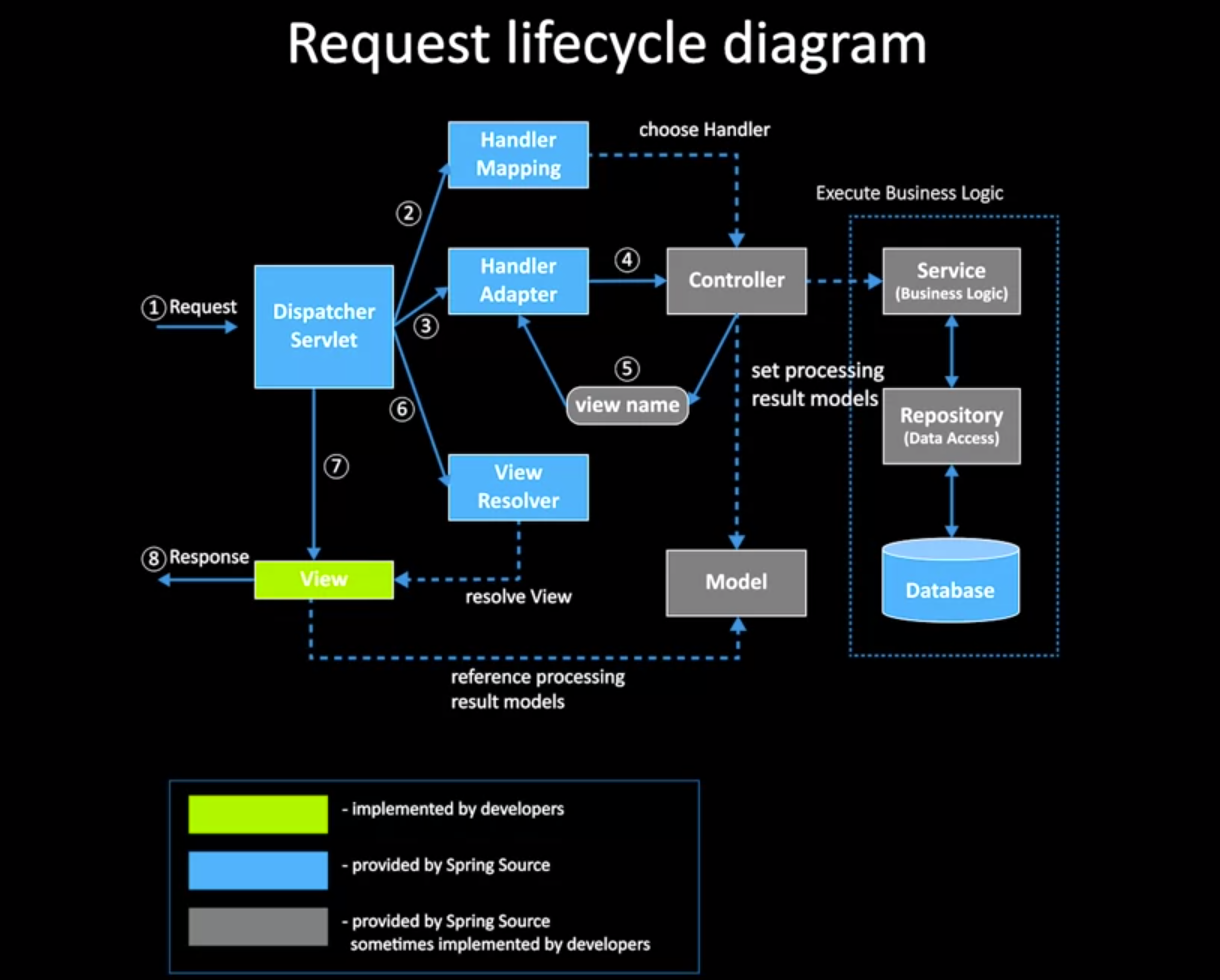
Model
Encapsulates application data (POJO)
ModelMap, which implementsModel, allows us to include data usingaddAttribute(String, Object)ModelAndViewallows us to return a view (JSP, template engine HTML) containing model references
@GetMapping("/goToViewPage")
public ModelAndView passParametersWithModelAndView() {
  ModelAndView modelAndView = new ModelAndView("viewPageWithGreetingModel");
  modelAndView.addObject("greeting", "holi");
  return modelAndView;
}
View
Renders the model data and generates HTML output for the client (browser). Spring provides the possibility of switching between many implementations of template engines using generic ViewResolvers
Example view implemented in thymeleaf:
<!DOCTYPE HTML>
<html xmlns:th="http://www.thymeleaf.org">
<head>
    <title>Title</title>
</head>
<body>
    <div>Web Application. Passed parameter : th:text="${greeting}"</div>
</body>
</html>
Controller
Processes user requests, builds the model, and passes it to the view for rendering. Servlets pass requests to the controllers. Controllers SHOULD NOT execute business logic (delegate on business dependency classes such as services, repositories, DAOs). @RequestParam is used to extract query params, and @PathVariable is used to extract params in the path. @RequestBody maps the body to a domain object or DTO, deserializing automatically from JSON; @ResponseBody tells the controller that the object returned is automatically serialized into JSON
@Controller
@RequestMapping({"/hello", "/hi"})
public class HelloController {
  @RequestMapping(method = RequestMethod.GET)
  public String printHello(ModelMap model) {
    model.addAttribute("message", "Hi");
    return "holi";
  }
}
// handling form submission and validation
@Controller
public class SomeController {
  @RequestMapping(value="/user", method = RequestMethod.POST)
  public String registerUser(
    @ModelAttribute("userForm") User user,
    BindingResult bindingResult
  ) {
    if (bindingResult.hasErrors()) ...
    else ...
  }
}
AbstractController
Convenient superclass for controller implementations, using the template method design pattern
DispatcherServlet
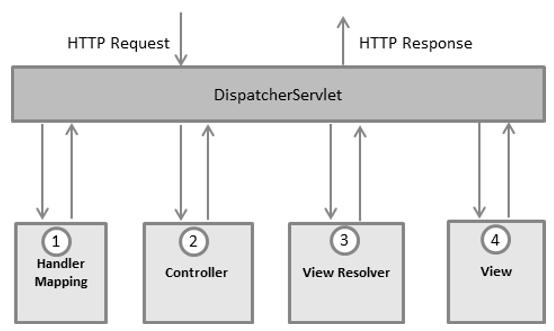
Here, the Handler Mapping, Controller and View Resolver (1, 2, 3) are parts of WebApplicationContext
HTTP request sequence of events
After receiving a HTTP request, the servlet:
- Consults the Handler Mapping (1) to call the appropiate controller
- The Controller (2) takes the request and calls the appropiate service methods. The service will set the model data and returns the view name to the servlet
- The servlet uses the View Resolver (3) to get the view of the request
- Once the view is finalized, the servlet passes the model data to the view, which is rendered on the browser
Spring MVC and Java config
Configure JSP in Spring MVC configuration, setting the views folder
@EnableWebMvc
@Configuration
public class WebConfig implements WebMvcConfigurer {

  @Override
  public void addViewControllers(ViewControllerRegistry registry) {
    registry.addViewController("/").setViewName("index");
  }

  @Bean
  public ViewResolver viewResolver() {
    InternalResourveViewResolver bean = new...
    bean.setViewClass(JstlView.class);
    bean.setPrefix("/WEB-INF/view/");
    bean.setSuffix(".jsp");

    return bean;
  }
}
Spring JDBC
DAO (Data Access Object)
DAO is a layer that interacts with the database, and has methods (CRUD) for that. Using DAOs implies decoupling the storage details from the other layers of the app
The Java application connects to the database using JDBC (Java Database Connectivity), a driver which allows us to manage the database using application code. JDBC presents a low level of abstraction, exposing many implementation details about how to connect to the database and manage entities
JPA (Java Persistence API)
The JPA is a high level specification which allows objects to be persisted. The JPA specification can be implemented in many ways, and Hibernate is one of the most popular implementations. The JPA spec provides an EntityManager and many annotations as an interface to interact with any database
Hibernate
Hibernate is an ORM (object-relational mapper) library for Java. Hibernate's family of tools has been expanded to include Search, Validator, OGM (noSQL implementation). An ORM interacts with the relational database mapping classes and fields to tables and columns
SQL, hibernate recap
Primary key (PK)
@Id
@GeneratedValue
private long id;
Generation strategies: AUTO, IDENTITY, SEQUENCE, TABLE
AUTO
GenerationType.AUTO is the default generation type and lets the persistence provider choose the generation strategy.
IDENTITY
GenerationType.IDENTITY is the easiest to use but not the best one from a performance point of view. It relies on an auto-incremented database column and lets the database generate a new value with each insert operation. It does not allow batching
SEQUENCE
SEQUENCE is the generation type recommended by the Hibernate documentation. SEQUENCE provides an optimization: instead of asking the DB for the next value after inserting a row, it already has a function for the next value in the sequence. This allows for batch inserting without retrieving the next value from the inserted row
TABLE
The TableGenerator uses an underlying database table that holds segments of identifier generation values. The disadvantage of this method is that it doesn't scale well and can negatively affect performance
Composite Identifiers
Composite PKs rules:
- The composite primary key class must be public
- It must have a no-arg constructor
- It must define the
equals()andhashCode()methods - It must be
Serializable
@IdClass vs @EmbeddedId tradeoffs
There are two strategies to generate composite identifiers: @IdClass and @EmbeddedId
@IdClass can be quite useful in places where we are using a composite key class that we can't modify. If we're going to access parts of the composite key individually, we can make use of @IdClass, but in places where we frequently use the complete identifier as an object, @EmbeddedId is preferred.
@JoinColumn and mappedBy
The @JoinColumn annotation combined with a @OneToOne mapping indicates that a given column in the owner entity refers to a primary key in the reference entity
The mappedBy attribute is used to define the referencing side (non-owning side) of the relationship
It's a good practice to mark the many side as the owning side
Rich Many-to-Many intermediate (join) table using a composite key
Normally, we can use the @ManyToMany annotation to create a bidirectional Many-To-Many relation, which creates an intermediate table called join table (just like plain SQL modeling). What happens if we want to store extra data in the join table? Let's store extra attributes in a join table of a @ManyToMany relationship:
// first, let's create a composite key
@Embeddable
class CitiesYearsKey implements Serializable {
  @Column(name = "musician_id")
  Long musicianId;

  @Column(name = "city_id")
  Long cityId;

  // constructors, getters, setters, hashcode and equals
}

// now let's create the join table:
@Entity
class CitiesYears {

  @EmbeddedId
  CitiesYearsKey id;

  @ManyToOne
  @MapsId("musicianId")
  @JoinColumn(name = "musician_id")
  Musician.musician;

  @ManyToOne
  @MapsId("cityId")
  @JoinColumn(name = "city_id")
  City city;
  int years;

  // constructor, setters, getters
}
ACID
- Atomicity: guarantees that the transaction either completes or doesn't do any side effect
- Consistency: ensures data changes are valid and follow certain rules (PK, FK, indexes, stored procedures)
- Isolation: determines how transaction integrity is visible from and to other transactions (READ UNCOMMITTED, READ COMMITTED, REPEATABLE READ, and SERIALIZABLE)
- Durable: committed transactions will be stored in the database permanently
Spring data repositories
Repositories abstract the data-store implementation details and allows us to write the business rules on a higher abstraction level. Spring Data provides the following implementations OOTB (out-of-the-box):
CrudRepository: generic CRUDPagingAndSortingRepository: an extension ofCrudRepository, providing additional pagination and sorting- JpaRepository: extends
PagingAndSortingRepositoryprovides JPA methods likeflush(), which flushes pending changes to the database
Spring Boot DB initialization
Spring boot can automatically create the schema (DDL from schema.sql) and initialize it inserting data (DML from data.sql). It loads SQL from those standard root classpath locations. We can also parametrize those scripts using schema-${spring.datasource.platform} anddata-${spring.datasource.platform} values, so we can have database-specific initialization scripts
Transaction management
void begin()
void commit()
void rollback()
void setTImeout(int seconds)
boolean isAlive()
void registerSynchronization(Synchronization s)
boolean wasCommited()
boolean wasRolledback()
...

Session session = factory.openSession();
// ... boilerplate ...
try {
  tx = session.beginTransaction();
  Musician musician = new Musician();
  musician.setName("someName");
  id = session.save(musician);
  tx.commit();
} catch (HibernateException e) {
  if (tx != null) tx.rollback();
} finally {
  session.close();
}
Now let's use a repository:
@Service
public class MusicianService {
  @Autowired
  private MusicianRepository repository;
}

public interface MusicianRepository extends CrudRepository<Musician, Long> { }
Spring REST
REST recap
Request: contains endpoint, method, headers, data or body
- Use plural nouns for endpoints (file system style URL pathing)
- Safe methods (GET, OPTIONS, HEAD): request which doesn't change the resource's condition
- Idempotent methods (GET, PUT, DELETE, OPTIONS, HEAD): n request executions == 1 request execution
- Use status codes accordingly (200, 201, 204, 304, 400, 401, 403, 404, 405 409, 415, etc)
- Headers: Host is mandatory in HTTP. Use Authorization, WWW-Authenticate, Accept, Content-Type, Cache-Control
ObjectMapper
The Jackson ObjectMapper is responsible for mapping the JSON data to the POJOs. When Jackson maps JSON to POJOs, it inspects the setter methods. Jackson, by default, maps a key for the JSON field with the setter method name
RestController
o_o
Exception handling
ControllerAdvice